Are you an Assam Government employee trying to figure out how to download your monthly salary slip? Whether you need it for a loan application, for income tax purposes, or simply to keep your financial records in order, accessing your payslip online can sometimes be confusing, especially if you have the wrong website link.
The good news is that the Government of Assam has a dedicated, centralized portal that makes this process entirely digital and straightforward. You no longer need to visit an office or wait for a physical copy.
This guide will provide you with a simple, correct, and verified step-by-step walkthrough of the entire process. We’ll cover everything from logging into the official Finassam portal to downloading and printing your salary slip, ensuring you get what you need in just a few minutes.
What is the Finassam Portal?
First, let’s clarify the platform. The official portal for salary and financial management for Assam Government employees is Finassam. This platform is part of the broader PFMS (Public Financial Management System) and is managed by the Finance Department. It is the single, integrated online system that handles salary processing, bill management, and other financial services for state employees. Your monthly salary slip is generated and securely stored on this portal.
Prerequisites: What You Need Before You Start
Before you begin, make sure you have the following information ready. This will make the process much smoother.
- Your Employee Code: This is your unique identification number as a government employee.
- Your Registered Mobile Number: The mobile number that is linked to your official employee profile.
- Your Finassam Password: The password you use to log in to the portal.
Important Note: If you have forgotten your password or have never logged in before, don’t worry. We will cover how to reset your password in the FAQ section below.
Step-by-Step Guide to Download Your Finassam Salary Slip
The entire process can be completed in just a few simple steps. Follow these instructions carefully.
Step 1: Visit the Official Finassam Login Portal
To begin, open any web browser on your computer or smartphone and navigate to the correct and official Finassam website.
- Official Link: https://finassam.gov.in/ or https://fin.assam.gov.in/ess/gotoEmpLogin
You will see the official login page for the “Public Financial Management System for Assam.”
Step 2: Log In to Your Employee Account
On the login page, you need to enter your details accurately.
- In the “User Name” field, enter your unique Employee Code.
- In the “Password” field, enter your Finassam password.
- Finally, click the “Login” button to proceed.
Step 3: Navigate to the Salary Slip Section
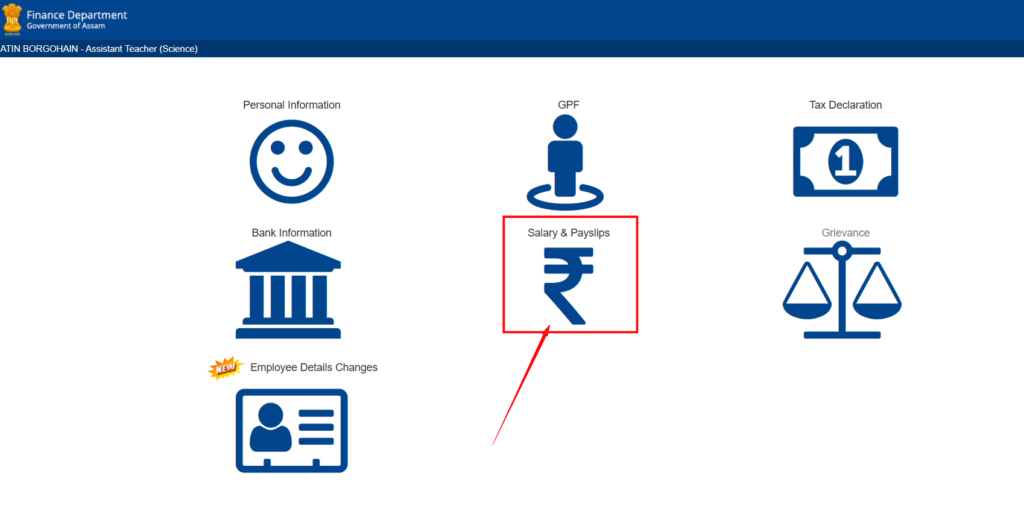
Once you are logged into your dashboard, you will see several options and menus on the left-hand side. You need to find the section related to your salary.
- Look for a menu item named “Salary & Payslips”
- Click on “Payslips.” A sub-menu will open.
- From the sub-menu, click on ” Payslips”.
Step 4: Select the Month and Year
The portal will now take you to the payslip generation page.
- You will see dropdown menus for “Pay Year” and “Pay Month”.
- Select the desired year (e.g., “2026”) and month (e.g., “January”) for the salary slip you wish to download.
- After selecting, click the “Generate” button.
Step 5: View and Download Your Salary Slip
Your detailed salary slip for the selected month will now be generated and displayed on the screen. It will contain all your earnings, deductions, and net pay.
- Carefully review the details to ensure everything is correct.
- To save it, look for a “Print” or “Download” icon, which is usually located at the top right of the payslip view.
- Clicking this will allow you to save the salary slip as a PDF file to your device. You can then store it for your records or print it out as needed.
Pro Tip: It’s a good practice to download and save your salary slip every month in a dedicated folder on your computer or cloud storage (like Google Drive). This helps in maintaining a proper financial record for future needs like ITR filing or loan applications.
Frequently Asked Questions (FAQ)
Q1: I have forgotten my Finassam password. How can I reset it?
Answer: On the Finassam login page ([ https://fin.assam.gov.in/ess/gotoEmpLogin]), you will find a “Forgot Password?” link below the login button. Click on it. You will be asked to enter your Employee Code and your registered mobile number. The system will then send you an OTP or a link to reset your password.
Q2: The Finassam website is not opening or is showing an error. What should I do?
Answer: Government websites can sometimes be slow or down for maintenance. First, ensure you are using the correct URL: finassam.in. If it’s still not working, try clearing your browser’s cache, using a different web browser (like Chrome or Firefox), or simply waiting for some time before trying again.
Q3: Can I download the salary slip on my mobile phone?
Answer: Yes, absolutely. The Finassam portal is mobile-friendly. You can follow the exact same steps using the web browser on your smartphone to log in and download your payslip.
Q4: My salary slip has an incorrect detail. How can I get it corrected?
Answer: The Finassam portal only displays the data that has been uploaded by your department’s DDO (Drawing and Disbursing Officer). If you find any discrepancy in your salary slip (like an incorrect name, bank account, or deduction), you must contact the DDO or the accounts section of your office to get it rectified. The issue cannot be fixed through the portal itself.
Q5: Can I download my salary slips for previous financial years?
Answer: Yes. The portal maintains a record of your past salary slips. You can select the desired year and month from the dropdown menus to access and download your old payslips, which is very useful for ITR filing and other financial verification purposes.
We hope this corrected and detailed guide has made the process of downloading your salary slip from the Finassam portal clear and easy. If you have any other questions, feel free to leave a comment below.